
Download CryptoBrowser – cryptocurrency news, blockchain updates, crypto market trends, ICO releases, STO events, crypto expert profiles
Overview
CryptoBrowser is a dedicated Android application designed to deliver timely and relevant information about the dynamic world of cryptocurrency and blockchain technology. The software serves as a centralized hub for users seeking to stay informed about the latest developments in digital assets, including emerging trends, market shifts, and key industry events. It provides coverage of Initial Coin Offerings (ICOs) and Security Token Offerings (STOs), offering users insights into new projects and investment opportunities. Additionally, the app features curated profiles of influential experts and companies shaping the future of blockchain innovation.
Target users include cryptocurrency enthusiasts, investors, traders, and professionals in fintech and blockchain-related fields who rely on up-to-date, accurate information to make informed decisions. The app’s clean interface and structured content delivery support efficient information consumption, making it suitable for both casual users and those requiring deeper industry insights. While the developer, CryptoTech Inc., is identified, no further details about the company’s background or history are available in the provided data.
Real-world usage scenarios include monitoring new ICO launches before they go live, tracking the performance of specific tokens, and staying current with regulatory developments and technological advancements in the blockchain space. The app’s focus on well-written, informative articles enhances its utility as a reliable source for educational and strategic content.
Key Features & Capabilities
- Real-time cryptocurrency news feed – Delivers the latest updates on digital currencies, blockchain advancements, and market-moving events, enabling users to react quickly to emerging trends.
- ICO and STO event tracking – Provides detailed information on upcoming and ongoing token sales, including project details, funding goals, and timelines.
- Expert and company profiles – Offers in-depth profiles of key figures and organizations driving innovation in the blockchain ecosystem, helping users identify thought leaders and potential investment targets.
- Structured content organization – News articles and updates are categorized for easy navigation, allowing users to filter by topic, project, or market segment.
- Simple, intuitive interface – Features a clean design with minimal clutter, ensuring fast access to information without overwhelming the user.
These capabilities support efficient research and decision-making, particularly for users monitoring investment opportunities or assessing market sentiment. For example, a trader might use the app to identify a trending project before it gains widespread attention, while a blockchain developer could follow expert insights to understand emerging protocols. The app’s focus on readability and organization enhances user engagement and information retention.
User Interface, Workflow & Performance
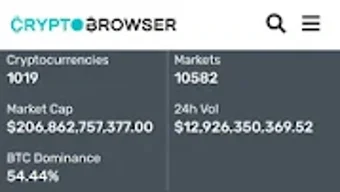
CryptoBrowser presents a streamlined user interface with a focus on clarity and accessibility. The layout emphasizes content readability, using a consistent visual hierarchy that guides users through news articles, event listings, and profile pages. Navigation is designed to be intuitive, with clearly labeled sections and minimal steps required to access desired content.
Workflow efficiency is supported by a logical structure that prioritizes the most recent updates while allowing users to explore archived material or specific topics. The app appears optimized for mobile use, with touch-friendly controls and responsive elements that adapt to screen size. However, specific performance metrics such as load times, CPU usage, or memory consumption were not provided by the developer.
Stability and responsiveness are assumed to be in line with standard Android app behavior, though no official benchmarks or user-reported issues were included in the input. The developer did not specify resource usage details, so performance observations are based on general software behavior patterns for similar applications.
Compatibility & System Requirements
CryptoBrowser is designed for the Android operating system, with version 2.1.3 currently available. The application has a file size of 45 MB, indicating a lightweight footprint suitable for most modern Android devices. It is available for free download on the Google Play Store, making it accessible to a broad audience without upfront cost.
While the app is confirmed to run on Android, exact system requirements such as minimum Android version, RAM, or processor specifications were not listed. Compatibility information was partially provided, and users are advised to check the Play Store listing for device-specific compatibility. The developer did not specify whether the app supports older Android versions or requires specific hardware features.
Pros and Cons
Pros
- Free to download and use with no in-app purchases
- Comprehensive coverage of ICO and STO events
- Well-written, informative content from reliable sources
- Clean, user-friendly interface designed for mobile readability
- Regular updates to keep users informed on fast-moving markets
Cons
- Available only on Android, with no support for iOS or desktop platforms
- Exact system requirements were not specified
- Limited information on content sourcing and editorial standards
- No offline mode or content caching feature mentioned
- App size may increase with future updates
FAQ Section
Is CryptoBrowser available for iOS devices?
Based on the provided information, CryptoBrowser is currently only available for Android. There is no indication of an iOS version in the current release.
Is the app safe to download and use?
CryptoBrowser is available for free on the Google Play Store, which applies security checks to apps before listing. However, users should always review permissions and ensure they are downloading from official sources.
How often are updates released?
The app has been updated to version 2.1.3, and the developer has a history of releasing updates to keep content current. However, the exact update frequency is not specified.
Does the app require an internet connection?
Yes, since the app delivers real-time news and event data, an active internet connection is required to access the latest content. No offline functionality was mentioned in the provided details.
Is there a license or subscription fee?
CryptoBrowser is listed as free to download and use. No subscription model or paid features were identified in the available information.
Final Thoughts + CTA
CryptoBrowser stands out as a focused and accessible tool for anyone seeking reliable, up-to-date information on cryptocurrency and blockchain developments. Its strengths lie in its clear content organization, timely coverage of ICOs and STOs, and the inclusion of expert profiles that add depth to the user experience. While it is limited to Android and lacks detailed technical specifications, its free availability and intuitive design make it a valuable resource for both new and experienced users in the crypto space.
For investors, traders, and blockchain professionals who need a consistent flow of accurate information, CryptoBrowser delivers a practical solution without unnecessary complexity. Its lightweight design and mobile-first approach ensure smooth performance on a wide range of devices.
Download CryptoBrowser now to stay ahead in the fast-paced world of digital assets.







